? One of the most famous newspaper website in Indonesia... At the left of the site, you can see a tab menu which is usually called "
". Why is it called Tab Menu? Because when the tab is clicked, it will move the menu content (wanna prove, just click the tab). However, it is a little different from the normal tab menu. The tab menu usually shows the content of the menu in turn or what we usually call "
". Kang Rohman takes a conclusion that menu has 2 functions; as a "
".
Kang Rohman was interested in that tab menu, tried to apply it in blogger template and it works. To see the sample of Slide Show Tab View menu, please visit
.
If you are interested in making
Slide Show Tab View menu, please follow the steps below
. #1 step
- Log in into blogger with your ID
- Click Layout
- Click Edit HTML tab
- Click Download Full template. Please back up your template first
- Copy the code below, then paste it above ]]></b:skin>
.indentmenu{ font: bold 11px Arial; width: 100%; /*leave this value as is in most cases*/ } .indentmenu ul{ margin: 2px; padding: 0; float: left; /* width: 80%; width of menu*/ background: transparent; } .indentmenu ul li{ display: inline; } .indentmenu ul li a{ float: left; margin: 2px; color: #000; /*text color*/ padding: 5px 11px; text-decoration: none; border: 1px solid #ccc; } .indentmenu ul li a:hover{ background:#ddd; } .indentmenu ul li a:visited{ color: white; } .indentmenu ul li a.selected{ color: white !important; padding-top: 6px; /*shift text down 1px*/ padding-bottom: 4px; border: 1px solid #000000; background:#000000; } .tabcontentstyle{ /*style of tab content container*/ border: 1px solid gray; width: 450px; margin-bottom: 1em; padding: 10px; } .tabcontent{ display:none; } @media print { .tabcontent { display:block !important; } }
- Before continuing, please download this script , copy it, then paste it right above </head>
- Click SAVE TEMPLATE
- The 1st is done. Now, why don't you take a rest first, drink coffee, tea or milk to make you relax

Ok, finish you coffee, let's continue to the 2
nd step
#2 step
- Click Page Element tab
- Click Add Gadget
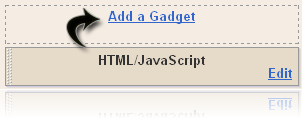
- Click plus button (+) for HTML/JavaScript. (img)

- Copy and paste the code in available column:
<div style="float:left;margin:0px 10px 0px 0px;padding:0px;height:350px;"> <div id="pettabs" class="indentmenu"> <ul> <li><a href="#" class="selected" rel="tab1">1</a></li> <li><a href="#" rel="tab2">2</a></li> <li><a href="#" rel="tab3">3</a></li> <li><a href="#" rel="tab4">4</a></li> </ul> <br style="clear: left"/> </div> <div style="width:240px;text-align:justify;padding: 5px; margin-bottom:1em"> <div id="tab1" class="tabcontent"> <a href="http://magazine-1.blogspot.com/2008/11/obama-will-change-bush-policy.html"> <img border="0" style="border-right: 0px; border-top: 0px; border-left: 0px; border-bottom: 0px" alt="obamabush" width="240" src="https://blogger.googleusercontent.com/img/b/R29vZ2xl/AVvXsEiQT7tLy2n9L7-5JzC-Jd8YQXXQZ8GOX-sJEAmE0hDz8-1VmIlybleuKixBd7siZJoVOCmLzXO0Am6vyLpectbKwEFjzh-5eCdtBAO-nBM8GBBlftlMa98CL_nVhJPihseb8oqr2W5PgCw/?imgmax=800" height="152" title="obamabush"/></a> <p><h3><a href="http://magazine-1.blogspot.com/2008/11/obama-will-change-bush-policy.html">Obama Will Change Busf Policy</a></h3></p> U.S. President Barack Obama will change several numbers of controversial policies by President George W. Bush, including the restriction of the parent embryo cell research [...] </div> <div id="tab2" class="tabcontent"> <a href="http://magazine-1.blogspot.com/2008/11/beyonce-will-never-sell-her-wedding.html"> <img border="0" style="border-right: 0px; border-top: 0px; border-left: 0px; border-bottom: 0px" alt="beyone" width="240" src="https://blogger.googleusercontent.com/img/b/R29vZ2xl/AVvXsEhGREM8NAyEse5RNbmvf5fj7lphxt52l2YhJZnHJ4n1PMbhuqjpDfLrm39RxuWO27fbvpsBoba-FvMovxwRxJGzgM3Q_sP0N-f0W12gziBfLe3jY4lkqEUjHoVeCb_-QB3Ax5Qni4CwxgI/?imgmax=800" height="152" title="beyone"/></a> <p><h3><a href="http://magazine-1.blogspot.com/2008/11/beyonce-will-never-sell-her-wedding.html">Beyone Will Never Sell Her Wedding Photo</a></h3></p> Beyonce said, she will never consider to sells her wedding photo with Jay-Z to a celebrity magazine that offering a large amount of money as rewards, even she wonder with the amount of money that offered to her [...] </div> <div id="tab3" class="tabcontent"> <a href="http://magazine-1.blogspot.com/2008/11/guns-n-roses-will-back.html"> <img border="0" style="border-right: 0px; border-top: 0px; border-left: 0px; border-bottom: 0px" alt="Guns N 'Roses" width="240" src="https://blogger.googleusercontent.com/img/b/R29vZ2xl/AVvXsEgqgqXbTPLEuooTs54GDwck_5HBxOHnOVj1772nxzbTILxVS8_L6ZjJ1WlBczDOVRY7cWXq03OH43vWrZ38XPfD0r-EpxfA7lATfks_rfnYQfBHzu64GXWEPj4fzHlmAcsXChTmG1idgVI/?imgmax=800" height="152" title="Guns N 'Roses"/></a> <p><h3><a href="http://magazine-1.blogspot.com/2008/11/guns-n-roses-will-back.html">Guns N 'Roses Will Back</a></h3></p> After 15 years not releasing album, the group rock Guns N ' Roses will launch a new album in the United States on 23 November. The band's latest album is "The Spaghetti Incident", released in 1993 [...] </div> <div id="tab4" class="tabcontent"> <a href="http://magazine-1.blogspot.com/2008/11/i-pod-can-make-your-ear-buzz.html"> <img border="0" style="border-right: 0px; border-top: 0px; border-left: 0px; border-bottom: 0px" alt="ipod" width="240" src="https://blogger.googleusercontent.com/img/b/R29vZ2xl/AVvXsEisXBORWdRGnFvOFsmYrcEObmZpsPujD0MSrceUjticMcCx3jL1WPtW5jmfmG0BnFQx0mZFPGYW9r-pkF_fjTn983tP4ujoz3UwFYSdQ8yFKLdZF3hWUhUCjOlDBv0lIRW_X6WrEm_-FKk/?imgmax=800" height="152" title="ipod"/></a> <p><h3><a href="http://magazine-1.blogspot.com/2008/11/i-pod-can-make-your-ear-buzz.html">Ipod Can Make Your ear Buzz</a></h3></p> Music is one way to wake the spirit, to create happy life, but what happens if the music makes the ears buzz? of course, not the music that makes the ear 'buzzy',[...] </div> </div> <script type="text/javascript"> var mypets=new ddtabcontent("pettabs") mypets.setpersist(true) mypets.setselectedClassTarget("link") mypets.init(2000) </script>
- Click SAVE TEMPLATE button.
- Finish and view you blog to see the result.
The code above is not absolute as Kang Rohman has written. You can modify it as your interest or suitable with your template.
Below is additional information that will ease you in modifying this code.
In the 1
st step, there is a row of CSS code, that code can be modified so that it produces a beautiful row tab.
Take a look at the code below
<div style="float:left;margin:0px 10px 0px 0px;padding:0px;height:350px;">
<div id="pettabs" class="indentmenu">
<ul>
<li><a href="#" class="selected" rel="tab1">1</a></li>
<li><a href="#" rel="tab2">2</a></li>
<li><a href="#" rel="tab3">3</a></li>
<li><a href="#" rel="tab4">4</a></li>
</ul>
<br style="clear: left"/>
</div>
This code is a tab row with the tab row such as1, 2, 3, and 4. You can change with your favorite ones, such
Recent Comments,
Recent Post, Shoutbox or anything you want. To arrange the height of your widget, change
height:350px with the value that you want, example;
height:400px.
Please, Pay attention the code below too.
<div style="width: 240px; text-align: justify; padding: 5px; margin-bottom: 1em"> The code above is used to arrange the menu content and it can be changed as you want to, such as;
width:240px : it is used to arrange the width, change it with the value that you want, example; width:300px.
text-align:justify : it is used to arrange the writing, change it with the value that you want,
Example; text-align:left, text-align:right.
Also, Pay attention the code below too.
<script type="text/javascript">
var mypets=new ddtabcontent("pettabs")
mypets.setpersist(true)
mypets.setselectedClassTarget("link")
mypets.init(
2000)
</script>
To arrange the moving of image from one tab to other tab, change
2000 with the value that you want, example;
2100.
Code in "
Slide Show Tab View" contains Kang Rohman Articles. Please change it with your own articles.
Have a nice trying
Original Script by:
dynamic drive. Modified by:
Blogspot tutorial  One of our motivations to make a blog is that our articles or pictures can be read by many people or visitors. We expect the visitors from many sources and one of them is from search engine, e.g; Google, yahoo, msn and others.

 Have you ever visited


 Postingan

